

Get Started Today! 708-781-7110

Preferred Blog
Preferred has been serving the Tinley Park area since 1991, providing IT Support such as technical helpdesk support, computer support, and consulting to small and medium-sized businesses.
Tip of the Week: Use Ctrl+F to Become a Search Master
 With an endless amount of content available on the World Wide Web, a person who’s skilled at Internet searching is a valuable asset to any company. Knowing how to use search engines like Google is a huge help, but there’s another tool that allows you to narrow down a search even further: Ctrl+F.
Ctrl+F is one of the most useful keystrokes that you’re not using. In your web browser, upon selecting Ctrl+F, a form will appear that you can use to enter whatever word it is you’re looking for. After doing this, it’s easy to locate your searched-for word because it will be highlighted.
If you don’t see your word, just scroll down a bit. It’s likely hiding off screen. Additionally, a browser like Chrome makes it even easier to locate a word because Chrome will display below the form how many searched-for words there are total on the page, as well as allow you to cycle through each word with an up and down button.
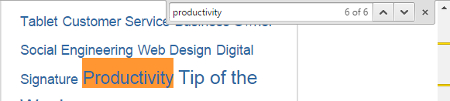
One of the greatest advantages of using Ctrl+F in conjunction with an Internet search is that it helps you to hone in on the exact word you’re looking for after you select the page from the search results. This is a great way to solve a common mystery when searching the web: “What in the world does this page have to do with what I’m looking for?” By opening the page and selecting Ctrl+F, you can very quickly find an answer to this question.
Thinking beyond web searching, locating words using Ctrl+F works in virtually any application that displays text. The next time you're working in a Microsoft Office app, Adobe PDF reader, or any other application, give Ctrl+F a try and see what happens.
Bonus Tip: When working in a word processing app, use Ctrl+H to locate your word, and replace each searched-for word with another word of your choosing. This is a quick and easy way to make a bunch of edits in one fell swoop.
By making Ctrl+F a regular tool in your keystroke arsenal, you will save yourself a lot of time and easily find the exact word you’re looking for in virtually any program. For more tips on how to get the most out of your technology, subscribe to Preferred’s blog for one great tip every single week!
About the author

Sign Up for Our Newsletter
Mobile? Grab this Article!

Latest Blog Entry
For many small and mid-sized businesses, cybersecurity once felt like something for the “big guys.” You had antivirus software, ran updates occasionally, and assumed your data was too small to attract attention. But that illusion is gone. Today, cybersecurity is no longer op...
Latest News
Preferred Communication Systems Acquires Business System Solutions’ Grand Rapids Operations, Expanding Midwest Footprint
GRAND RAPIDS, MI, UNITED STATES, December 3, 2025 -- Preferred Communication Systems (Preferred), a leading provider of Managed IT and Cybersecurity services headquartered in Chicago, Illinois, proudly announced the acquisition of Business System Solutions’ (BSS) Grand Rapids location.
This strategic acquisition enhances Preferred’s presence in the Midwest and strengthens its commitment to helping small and mid-sized businesses achieve peace of mind and a better bottom line through technology.
Copyright
Preferred. All Rights Reserved. Privacy Policy


Comments